

Finance and accounting
Your books are kept from the first sale.
Maduuka posts every transaction to double-entry books on every package, Free included. When you need the accountant's tools, they open on a history that is already complete.
How the books are kept
The cashier sells. Maduuka writes the journal.
Most small businesses keep their accounts after the fact: someone gathers receipts, sales books and bank slips at month end and types them into a second system. Errors creep in, and the books are only as good as the person who reconstructed them.
In Maduuka the accounting happens in the same step as the work. Each of these creates a balanced debit and credit the moment it is recorded:
- A cash, card, mobile money or credit sale at the till
- A customer paying off an invoice or a deposit settling unpaid sales
- A supplier bill, a goods receipt and the payment that clears it
- An expense, a petty cash payment or a prepaid cost
- A stock transfer, an adjustment or a count difference
- A payroll run with PAYE, NSSF and LST, on packages that include payroll
- Restaurant bills, pharmacy sales, hotel folios and city ledger charges
Posting works the same way on every package: whatever a shop on the Free plan records is posted exactly as it would be on the Hotel plan.

Start small, upgrade without losing history
Upgrading opens the accountant's tools on books you already have
When a business moves to Premium or an industry package, Maduuka does not begin keeping accounts that day. The accounting workspace opens on the ledger that has been running since the first sale, so the first Balance Sheet you print already reflects the months you traded on Free, Basic or Standard.
On every package
What Maduuka does for you from day one. Bank and mobile money reconciliation is included from Standard.
- Every transaction posted to a double-entry ledger as it happens
- Cash, bank and mobile money accounts with live balances
- Transfers between accounts, with both sides linked
- An accounting readiness check that flags anything unposted
- Gap-free document numbers and a full audit log
Premium and industry packages
The accountant's workspace, opened on your full history.
- Chart of accounts and account mappings
- General ledger with drill-down to the source document
- Trial balance, manual journals and accounting periods
- Month-close checks, period locks, year-end close and opening balances carried forward
- Advanced financial reports and the business health dashboard
- Fixed asset register, depreciation runs and register-to-ledger tie-out

Ready for the bank, the investor and the auditor
Records that stand up when someone else reads them
A loan officer, an investor or an auditor does not only want to see a profit figure. They want to know the figure is complete, that it agrees with the cash, and that nobody rearranged the history before the meeting. Maduuka is built so that your records can answer those questions.
Statements that tie together
The Profit and Loss, Balance Sheet and Cash Flow come from one ledger, so the profit, the cash and the closing balances agree with each other.
A history that goes back
Because posting starts with the first sale, the statements cover the months you traded, including the months on a smaller package.
Figures that can be explained
Any balance can be traced to journals, and any journal to the numbered document that created it. When someone asks where a number came from, you can show them.
Records nobody tidied up later
Append-only journals, voids instead of deletions, unbroken numbering and a full audit log show that the record was kept as the business ran.
Controls that protect the record
The rules an accountant would insist on, built into the software rather than left to good intentions.
Posted journals cannot be edited
Once a journal is posted, the database refuses changes to it. A mistake is corrected with a reversing entry, so the original and the correction both stay on the record.
Voided, never deleted
An invoice, receipt or payment that should not stand is voided with a reason. It keeps its number and stays visible in the void registers, so nothing disappears quietly.
Gap-free document numbers
Invoices, receipts, credit notes, purchase orders, expenses, transfers, payroll runs and journals each run on their own unbroken sequence, allocated when the document is issued. Forty-two document types follow this rule.
Every journal names its document
Each journal line carries the number of the invoice, receipt or bill that created it. From any figure in the ledger you can reach the document behind it, and Find a document locates it again by number, customer, supplier or date.
Periods that close properly
Month-close checks flag unposted or unbalanced items before you close. Closed periods are locked, and year-end close carries balances forward instead of starting from scratch.
A second person for sensitive entries
Manual journals of certain kinds and refunds above the owner's limit need approval from a second person, who signs in with their own account. Every decision is recorded against a name.
Cash, mobile money, bank and expenses
The daily money work that feeds the books.
Every account, its own balance
Cash tills, petty cash, MTN MoMo, Airtel Money, bank and SACCO accounts each show opening balance, money in, money out and closing balance for any day. Each POS payment lands in the account it was paid into.
Transfers and deposits that link up
Moving cash from the till to the safe, or from mobile money to the bank, reduces one account and increases the other in a single numbered transfer. Banking the day's takings becomes a numbered, traceable entry.
Reconciliation you can return to
Match each bank or mobile money account against its statement. Items that do not match stay visible for review instead of being forced to balance.
Expenses with approval
Expenses can wait for a manager's approval before money leaves the account. Petty cash, prepaid costs such as rent paid in advance, and bad debts written off each have their own controlled workflow.
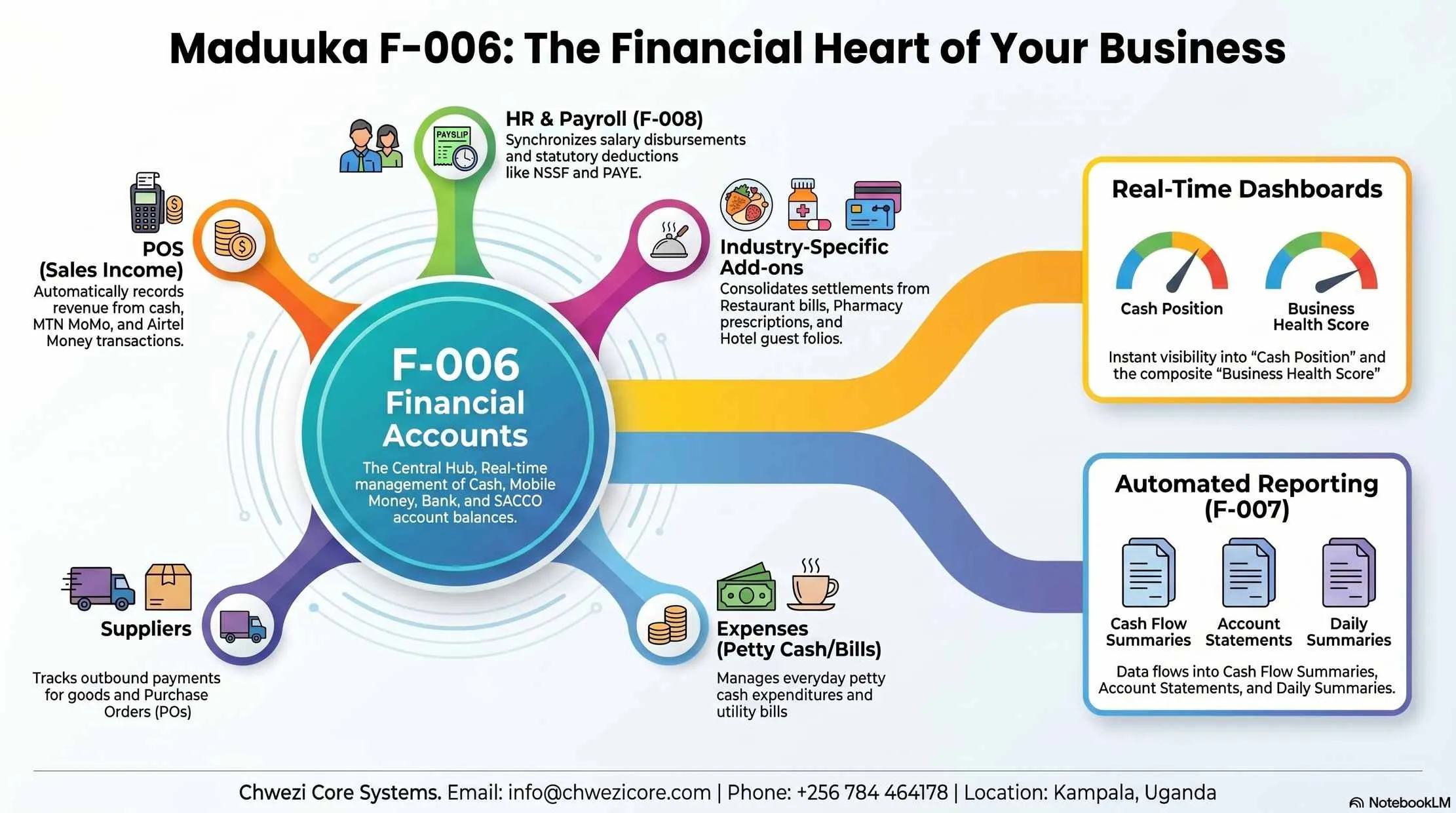
Finance module map
How sales, expenses, payroll and reports fit together
Collections, payments, approvals, transfers, payroll and reconciliation all feed one ledger, and the statements are read from that ledger.

Reports
From the daily cash summary to the year-end statements
Profit and Loss, with revenue, cost of sales, expenses and net profit
Balance Sheet, with assets, liabilities, equity, receivables, payables and stock value
Cash Flow Statement, by the direct or the indirect method
General ledger and trial balance, with print and PDF versions
Debtors ageing and customer statements
Fixed asset register, depreciation schedules and disposals
Tax payable report from the VAT recorded on sales and purchases
Payroll summaries with salaries, allowances, deductions, PAYE, NSSF and net pay
Daily account summaries with opening balance, inflows, outflows and closing balance
Branch comparison and business health reports
Statements print or download as PDF, and report data exports for your accountant.
One system, not two
No second package to retype your sales into
A separate accounting package means someone copies sales, payroll, expenses and stock values across every month, and every copy is a chance to get it wrong. Maduuka's accounting is fed directly by the modules where the work happens.
That covers the inventory valuation behind cost of sales, the restaurant bill, the pharmacy sale, the hotel folio and the payroll run. Each one is already in the books by the time your accountant looks.
On the Android app, owners can read the trial balance, the Profit or Loss, money reports and the business asset register from their phone. The app reads the same cloud ledger as the web app.
Role permissions decide who can record, approve and view financial information, and the audit log records who did what.
Inventory, purchasing and payroll feed stock value, cost of sales, supplier balances and staff costs without a separate entry.

Android app · works offline
Your books stay clean when sales happen offline
The Android app can keep selling with no connection, but nothing reaches your ledger until the server has checked it.
- Offline sales post as normal invoices once the connection returns
- The server gives the official, gap-free document numbers
- Expenses written offline arrive as drafts, never as paid
- Refunds become requests a manager completes online
Finance and accounting questions
Straight answers for owners, managers and accountants comparing Maduuka with a separate accounting package.
Does Maduuka keep double-entry books on the Free and Basic packages?
What happens to my earlier transactions when I upgrade?
Which packages include the accountant's tools?
Can I give my financial statements to a bank or an investor?
Can a posted entry be changed or deleted?
Does Maduuka follow IFRS?
Can Maduuka handle mobile money and bank accounts?
How does payroll reach the books?
Make your first sale and your books begin with it
Start your 30-day trial and make your first sale; the ledger starts with it. For help moving your existing records in, contact Chwezi Core Systems at info@chwezicore.com or call or WhatsApp +256 784 464 178. Data migration and training are a separate, quoted service.