
If you are evaluating restaurant workflow software, the important question is not whether the POS can print a bill quickly. The better question is whether the order, the kitchen, the ingredients, the invoice, the payment, and the shift close still tell the same story by the end of service.
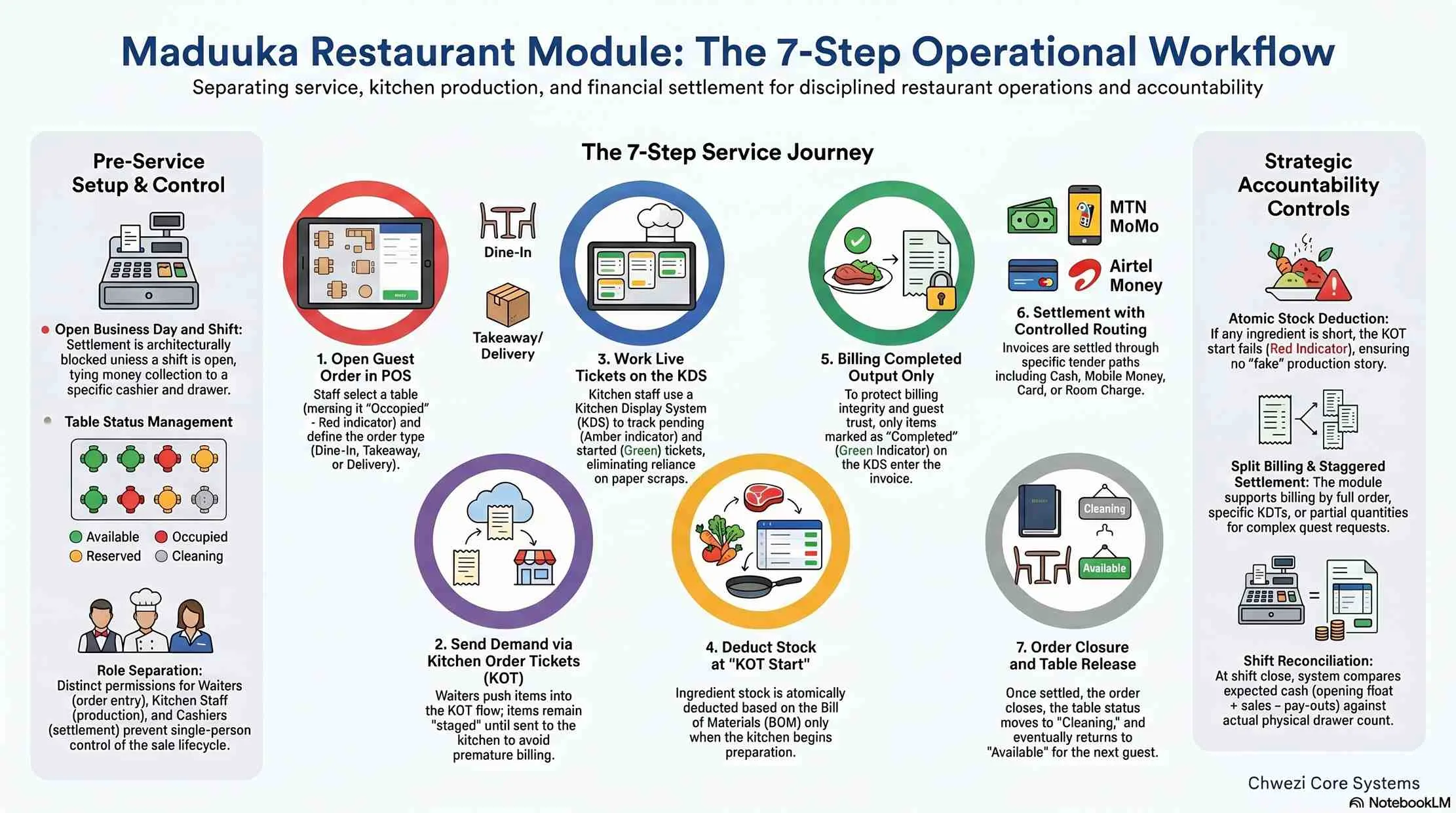
In Maduuka, they do. The restaurant workflow moves from POS order -> KOT -> KDS -> completed output -> invoice -> settlement -> table release. That separation is what keeps service fast without letting stock, cashiering, or kitchen accountability drift apart.
The article below explains how that works in practice and why it matters for restaurants, cafes, bars, and hospitality businesses that need tighter control than an ordinary till can provide.

Direct Answer
What is the Maduuka restaurant workflow?
The Maduuka restaurant workflow is a controlled operating sequence that separates POS order capture, kitchen production, ingredient deduction, billing, settlement, and closure. The system bills only what the kitchen completed and settles only through a guarded payment step tied to shift accountability.
Overview
The seven-part chain from table open to shift close
This is the operational spine of the restaurant module. It is simple enough for teams to learn quickly, but strict enough to support cleaner reconciliation at the end of the day.
Step 1
Open the guest order in POS
Step 2
Send demand to the kitchen as KOTs
Step 3
Work live tickets on the KDS
Step 4
Treat only completed output as billable
Step 5
Create the invoice from completed items
Step 6
Settle with controlled tender routing
Step 7
Close the order, release the table, and close shift
Step by Step
How the workflow protects service, stock, and cash
The key design principle is separation. Each phase is allowed to do its own job, but not to silently take over the next one.
1. Pre-service setup and shift control
Before service starts, the outlet needs tables, prices, ingredients, and the business day ready.
Maduuka expects the restaurant module to be enabled, tables configured, products and prices active, ingredient mappings defined, and the business day open.
The cashier must also have an open restaurant shift. Settlement is blocked if there is no open shift, which keeps money collection tied to a real drawer window.
Operational states stay readable: orders are `open`, `closed`, or `cancelled`; tables are `available`, `occupied`, `reserved`, or `inactive`; KOTs are `pending`, `started`, `completed`, or `cancelled`.
2. POS order creation
The order becomes the umbrella record for the whole guest session.
Staff can create restaurant orders as `dine_in`, `takeaway`, `delivery`, or `no_charge`.
For dine-in, the selected table is attached immediately and marked `occupied` so the floor stays operationally honest.
KOTs, billing, and settlement all trace back to the same restaurant order rather than becoming disconnected events.
3. KOT creation and KDS execution
Demand is captured first, then the kitchen confirms fulfilment through a visible production queue.
Items added by the waiter do not become billed output immediately. They first move into the KOT flow as production instructions for the kitchen.
A KOT requires an open order, starts as `pending`, can still be updated while pending, and captures selling prices at creation time.
The kitchen display shows active pending and started tickets, plus recent completed or cancelled tickets for short-term visibility.
4. Stock deduction at KOT start
Ingredient stock moves when production becomes real, not when the waiter taps the screen.
When the kitchen starts a KOT, Maduuka expands menu items into BOM or ingredient requirements and issues stock through warehouse rules.
The deduction is atomic. If any ingredient is short, the KOT start fails instead of creating a fake production story.
Cancelling a pending KOT simply stops it, while cancelling a started KOT reverses stock so inventory stays aligned to real kitchen work.
5. Billing only completed kitchen output
Financial recognition follows production, not wishful service.
Only `completed` KOT items are billable. `pending` and `started` items do not enter the invoice yet.
Maduuka supports billing by full order, selected KOTs, or partial quantities, which works for split bills and staggered settlement.
Already billed quantities are tracked so the same KOT item cannot be invoiced twice.
6. Settlement, closure, and release
Payment sits behind one controlled settlement layer, then the table and shift are closed properly.
Settlement requires an unlocked business day, an open cashier shift, a valid invoice, and at least one tender.
Tender routing supports `cash`, `mobile_money`, `card`, `room_charge`, `city_ledger`, `complimentary`, and `no_charge`, each with its own posting path.
When service is done, the order closes, the table returns to `available`, and shift close compares expected cash against the counted drawer.
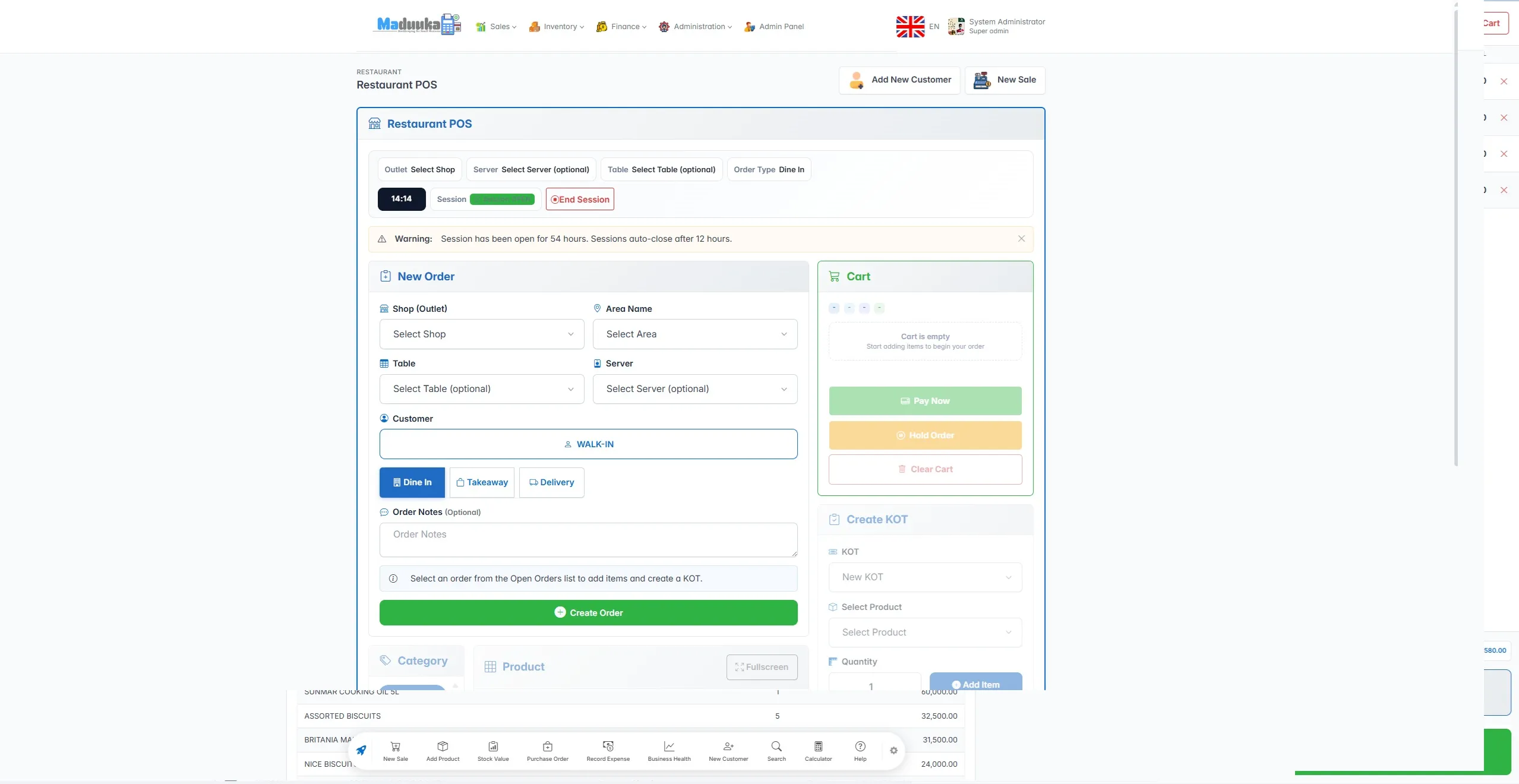
Restaurant POS
Front-of-house staff open orders, attach tables, and push items into the KOT flow without prematurely treating them as billed output.
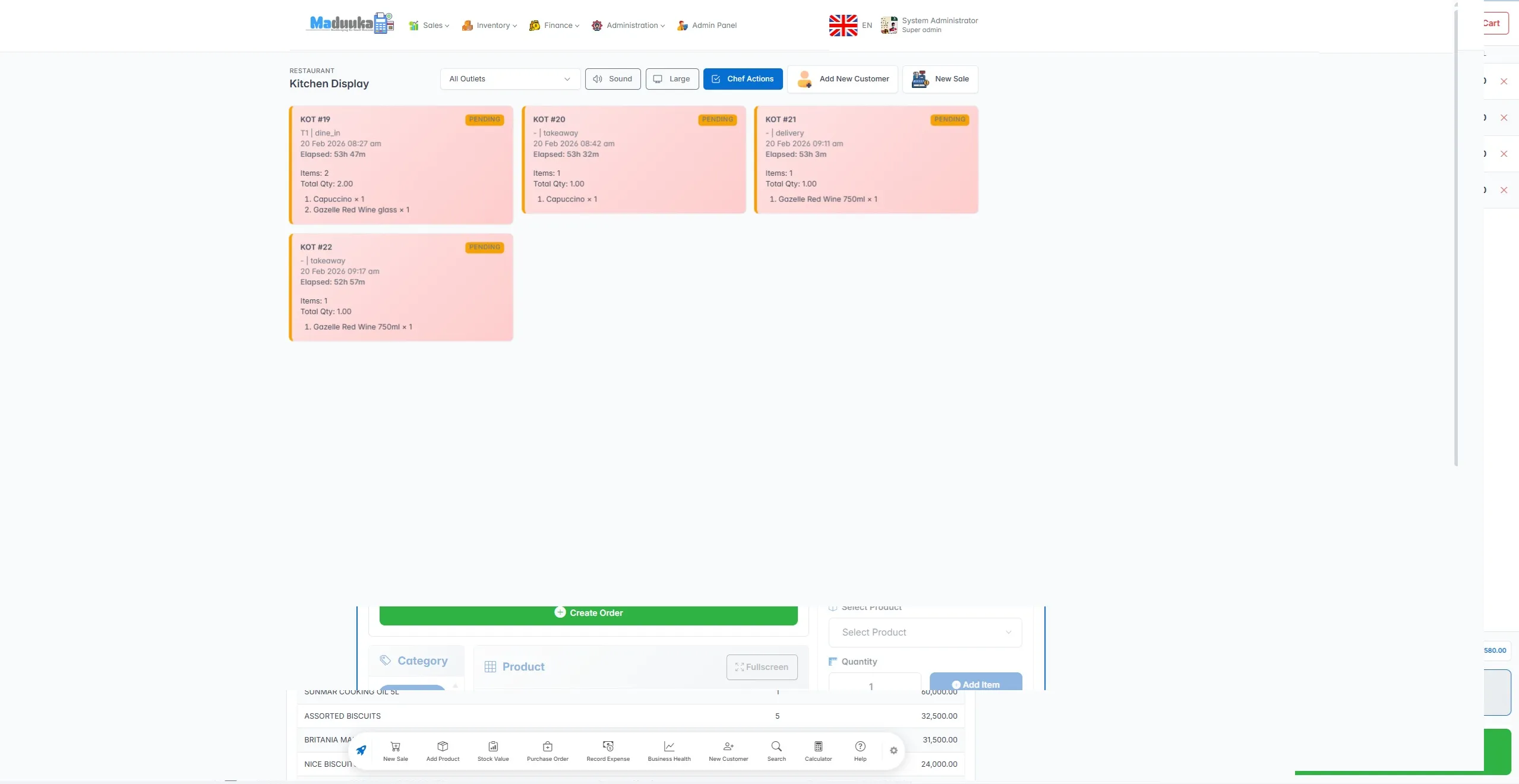
Kitchen Display
Kitchen staff work live tickets through pending, started, completed, or cancelled states with table and item context visible on screen.
Why This Matters
Why kitchen start is a stronger stock control point than POS entry
A waiter can request five dishes. That does not prove the kitchen produced five dishes. It certainly does not prove five dishes worth of ingredients should already be missing from stock.
By deducting ingredients when a KOT actually starts, Maduuka makes production the stock-moving event. That is a cleaner control model for restaurants, bars, and hospitality outlets where service intent and kitchen fulfilment often diverge.
This also makes cancellation cleaner. A pending KOT can stop without touching stock. A started KOT can reverse stock through a controlled path instead of leaving manual cleanup for later.
Settlement Layer
Tender routing that fits restaurants and hospitality
The payment layer has two jobs: accepting money, and sending each payment type to the right operational and accounting destination.
Cash, mobile money, and card
These update invoice payments and the relevant cash or payment-account ledgers.
Room charge
This posts the restaurant charge to the hotel folio instead of the drawer, which matters for hotel restaurants and bars.
City ledger
This routes the amount into receivables or customer credit, which suits corporate tabs and account customers.
Complimentary and no charge
These close the invoice through controlled audit paths rather than pretending a normal cash payment happened.
Management Value
What owners and managers gain from this workflow
The restaurant workflow becomes easier to trust because order state, kitchen state, invoice state, and shift close each happen at the right moment instead of being blurred into one screen event.
Kitchen visibility
The KDS keeps pending, started, completed, and cancelled KOTs visible instead of leaving the kitchen to work from memory or paper scraps.
Ingredient discipline
Stock is consumed when a KOT starts, not when the waiter types demand, so kitchen execution and inventory stay closer together.
Billing discipline
The business can invoice only completed kitchen output, which reduces disputes and prevents billing dishes that never reached completion.
Cash accountability
Settlement is blocked without an open shift, and cash close compares opening float, tenders, pay-ins, pay-outs, and actual drawer count.
Hospitality flexibility
Room charge and city ledger support let the same workflow serve restaurant-only operations and hotel-linked food and beverage service.
Cleaner night reconciliation
Order state, KOT state, invoice state, and shift close all tell a tighter operational story by end of day.
What this means in day-to-day restaurant operations
A table can stay open while more KOTs are added. The kitchen can finish some items while others are still in progress. Billing can happen by completed items, full order, or selected quantities. Settlement can route to cash, card, mobile money, hotel folio, or city ledger. Then, and only then, the order closes and the table goes back to `available`.
That is why the workflow is useful beyond ordinary restaurants. It also suits bars, cafes, fast casual operations, and hotels that need restaurant billing to talk cleanly to room charges. If you want the broader operational view, see the restaurant module page. For ingredient stock, BOM deductions, transfers, and reorder control, read the inventory management system page. If your business also needs room-charge posting, the hotel module shows how that fits into the same platform. The Maduuka software architecture guide shows how that workflow connects to the shared API, business core, and data layer.
FAQ
Restaurant workflow questions people usually ask
What is the key control in the Maduuka restaurant workflow?
The workflow separates demand capture, kitchen execution, billing, and settlement. A waiter can open an order, but only completed kitchen output becomes billable and only a controlled settlement step records payment.
When does Maduuka deduct restaurant stock?
Ingredient stock is deducted when the kitchen starts the KOT, not when the waiter creates the order and not when the invoice is later settled.
Can one table have multiple kitchen tickets?
Yes. One restaurant order can hold multiple KOTs, which supports drinks now, mains later, desserts after, and any other real service pattern.
Why does Maduuka bill only completed KOT items?
Because the business should invoice what the kitchen actually produced rather than everything that was requested. That rule protects both guest trust and reconciliation quality.
Next Step
See the workflow against your own service model
If your team needs a tighter connection between the floor, the kitchen, the cashier, and end-of-day reporting, walk through it live with Maduuka. The useful test is not a brochure. It is whether your real restaurant flow still holds together under pressure.