

If you are searching for pharmacy management software, a pharmacy management system, drug store software, or a pharmacy POS app that actually tracks batches and expiry dates, this article is for you. Maduuka is built specifically for the way pharmacies and drug stores work in Uganda, Kenya, Rwanda, Tanzania, and francophone Africa, not as a generic retail till with medicine names typed in.
A pharmacy is not a regular shop. In a regular shop, a wrong stock count is an accounting problem. In a pharmacy, a wrong stock count can mean a patient leaves without the medicine they came for. An expired tablet sold by mistake is not a "shrinkage" line in a report. It is a safety issue, a regulator issue, and a reputation issue. That is why Maduuka treats pharmacy inventory differently from general retail inventory.
Drug stores need more than a quantity on hand. They need to know which batch is on the shelf, when it was received, when it expires, who supplied it, and which batch should leave first. The rest of this article explains exactly how Maduuka does that.

Direct Answer
How does Maduuka help pharmacies track inventory, batches, and expiry dates?
Maduuka tracks each medicine as a set of distinct batches, each with its own lot number, expiry date, received quantity, unit cost, and supplier. The pharmacy POS automatically dispenses the batch with the earliest expiry first (FEFO), expiry dashboards group stock into 30, 60, and 90-day buckets, and the till blocks the sale of expired batches. Recalls, customer returns, and write-offs all preserve batch identity, including across multi-branch transfers.
Core Capabilities
What Maduuka's pharmacy inventory module does
Six controls that distinguish real pharmacy management software from a retail POS with medicine names typed in. Each one shows up directly in the daily life of a drug store: at the counter, in the back office, and on the owner's phone.
Batch-level stock, not just a total
Every pharmacy item carries its own active batches with lot number, expiry date, received quantity, unit cost, supplier, and invoice reference. The on-hand total is simply the sum of those live batches.
FEFO dispensing by default
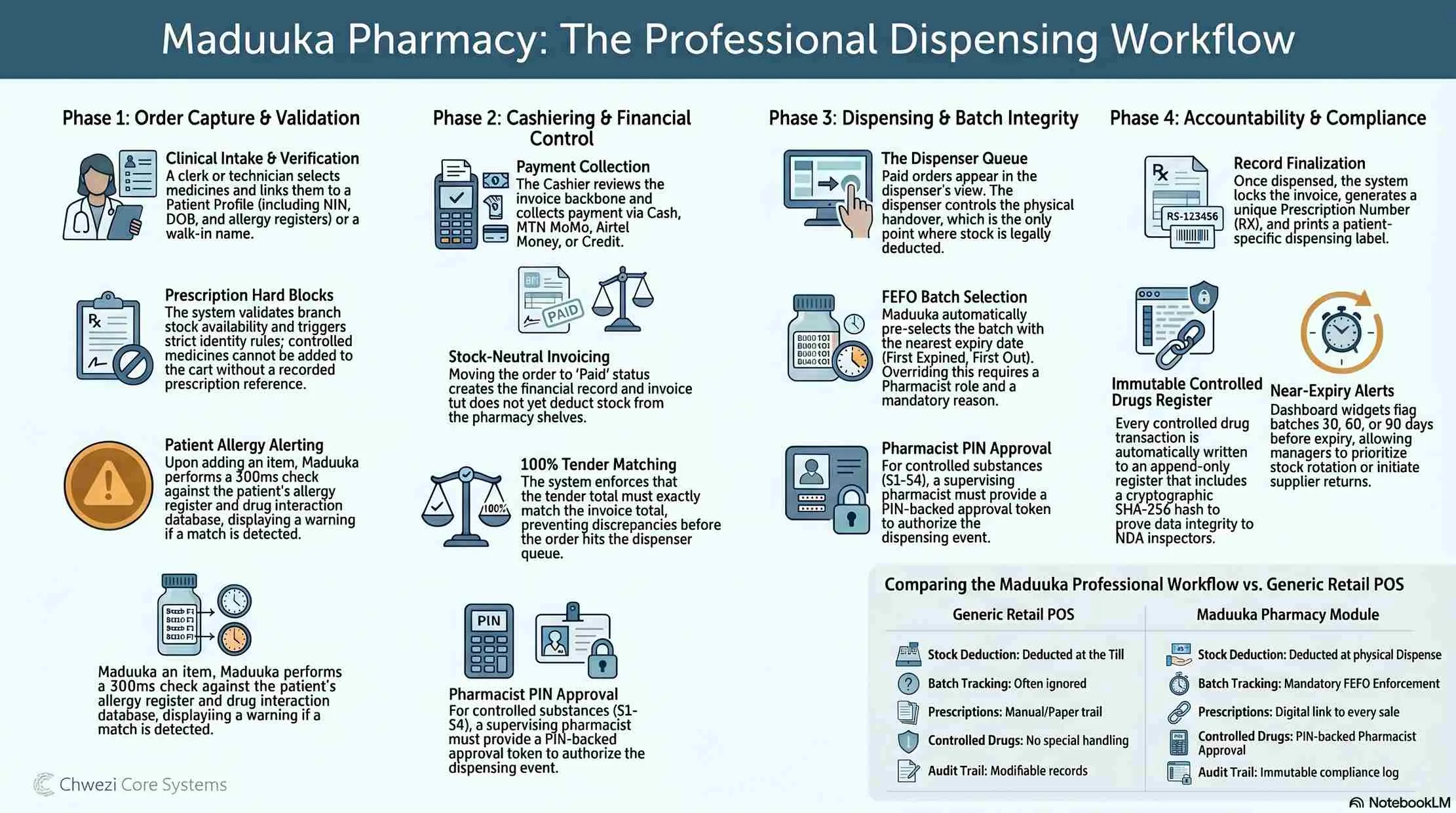
When a cashier scans a medicine at the pharmacy POS, Maduuka picks the batch with the earliest expiry date that still has stock and deducts from that batch first: First Expiry, First Out, automatically.
Expiry buckets you can act on
Stock is grouped into expired, expiring in 30 days, 60 days, and 90 days. The drug store sees what is about to become unsellable, and how much money is sitting in it.
POS guardrails against expired sales
If the only remaining batch of a medicine has passed its expiry date, the POS blocks the sale and flags it for write-off. No expired tablet can leave through the till.
Write-offs, recalls, and returns
Expired stock leaves through a documented write-off. Recalled batches are traceable across every branch. Customer returns go back to the original source batch where possible.
Multi-branch transfers keep batch identity
When stock moves between warehouse and branches, batch number, expiry date, and cost travel with it. Owners see exactly where each batch is across the whole pharmacy business.

The Core Problem
One product, many batches
A box of paracetamol on the shelf today is not the same as the box that was on the same shelf three months ago. They share a name, a strength, and usually a barcode. But each batch has its own manufacturing date, its own expiry date, and its own supplier invoice.
If the system only tracks "Paracetamol 500mg — 240 tablets in stock," the pharmacist cannot answer simple but critical questions: Which of those 240 tablets expire next month? Did we ever receive a recalled batch? Which supplier sold us the batch that has started failing quality checks? What is the value of stock that will expire within 90 days?
Maduuka solves this by tracking inventory at the batch level for pharmacy items. A single product can have many active batches, each with its own quantity, cost, expiry date, batch number, and supplier reference. The total quantity on hand is simply the sum of all active batches, but every transaction underneath is tied to a specific batch.
The Batch Lifecycle
From goods-received note to write-off, recall, and return
The five stages every batch passes through inside Maduuka. The pharmacist does not need to think about most of this. The system enforces the rules so the team can focus on patients.
1. Receive — capture batch data at the goods-received note
A pharmacy delivery is never just a quantity. It is a set of distinct batches.
For each medicine, the receiver records the printed batch or lot number, expiry date, quantity, unit cost, supplier, and supplier invoice reference.
If a delivery contains two batches of the same product, Maduuka records them as two separate batch lines. They are never merged into an average.
Each new batch becomes a live record with its own status (active, expired, recalled, quarantined) and full movement history from day one.
2. Store — keep batch identity on the shelf and in the warehouse
Batches keep their own cost, supplier link, and expiry date as long as they exist in stock.
Transfers between warehouses and branches move the original batch records, not a generic quantity stripped of context.
Owners can query a single batch number across the whole multi-branch pharmacy and see where every remaining unit is.
Reorder logic considers near-expiry stock differently from healthy stock, so the system does not treat soon-to-expire inventory as fully stocked.
3. Sell — dispense the right batch automatically
FEFO is not a procedure the pharmacist has to remember. It is built into the POS.
The pharmacy POS picks the active batch with the earliest expiry date and deducts from that batch first.
If a batch runs out mid-sale, Maduuka rolls forward to the next-earliest batch and continues without interrupting the cashier.
Each receipt and sales record links back to the exact batch dispensed, the foundation for recalls, audits, and quality investigations later.
4. Watch expiry — surface deadlines before they cost money
Expiry is a rolling deadline, not a single date in the future.
Expiry dashboards group stock into clear buckets so the pharmacist sees what needs attention this week.
Near-expiry medicines are flagged in product detail screens, in stock counts, and inside the reorder advisor.
The POS blocks expired-batch sales outright, forcing a proper write-off instead of a quiet push to the back of the shelf.
5. Write off, recall, and return — keep the books honest
Expired, recalled, and returned stock leaves the system through explicit, audited paths.
Expiry write-offs record the batch, the discarded quantity, the reason, and the cost, which is posted to the right expense account so the P&L reflects real losses.
Recall searches by batch number show every branch holding affected stock, the remaining quantity, and the customers it was sold to (where the sale was linked to a customer record).
Customer returns roll back to the original source batch where possible, so the stock figure and the batch history remain consistent.
FEFO in Practice
Selling from the right batch — First Expiry, First Out
In a normal retail shop, the order in which stock leaves the shelf does not matter much. In a pharmacy, it matters a lot. The batch closest to expiry should be sold first. This is known as FEFO — First Expiry, First Out.
Maduuka applies FEFO automatically when a pharmacy item is sold at the POS. When a cashier scans a product, Maduuka does not deduct one unit from a generic stock figure. It looks at all the active batches of that product at that branch, picks the batch with the earliest expiry date that still has stock, and deducts from that batch.
If a batch runs out mid-sale, Maduuka rolls forward to the next-earliest batch and continues. The cashier does not have to think about it. The pharmacist does not have to remember which batch to push first. The system enforces the policy, even on a busy Saturday with two queues at the counter.
The receipt and the sales record both keep a link back to the exact batch sold. That link is what makes recalls, audits, and quality investigations possible later.


Expiry Visibility
Catching expiry before it becomes a write-off
Expiry is not a single date in the future. It is a moving deadline that needs attention every week. Maduuka surfaces expiry information in three concrete ways.
Expiry dashboards. The pharmacy module groups stock into clear buckets: expired, expiring within 30 days, expiring within 60 days, and expiring within 90 days. The pharmacist sees, at a glance, which products are about to become unsellable and how much money is sitting in them.
Smarter reorder decisions. When Maduuka suggests reorders, it treats near-expiry stock differently from healthy stock. A product may show 200 units on hand, but if 180 of those expire in three weeks, the reorder logic does not pretend the shop is fully stocked.
POS guardrails. A cashier cannot accidentally sell an expired batch. If the only remaining batch of a product has passed its expiry date, Maduuka blocks the sale and flags it. The expired stock must be removed through a proper write-off, not through the till.
Write-offs, Returns, and Recalls
When a batch has to leave the books cleanly
Expired, recalled, and returned stock all leave Maduuka through explicit, audited paths, never through a quiet stock adjustment. That is what makes the books defendable in front of an inspector, an auditor, or a funder.
Expiry write-offs
The pharmacist selects the batch, enters the quantity to discard, and writes a short reason. The cost is posted to the right expense account so the monthly P&L reflects expiry losses honestly.
Recalls by batch number
The pharmacist searches the recalled batch number. Maduuka shows every branch where the batch is, how much remains, and which customers were sold from it. The recall write-off removes affected stock.
Customer returns to source batch
When a customer brings back medicine inside the return window, Maduuka returns the units to the original source batch where possible, so stock figures and batch history stay consistent.
Multi-branch Pharmacies
Batch identity that survives warehouse transfers
Most growing drug stores eventually run more than one outlet. Maduuka handles that without losing batch identity.
When stock moves from a central warehouse to a branch, the batch information travels with it. The branch does not receive "100 units of Amoxicillin." It receives "60 units of Amoxicillin batch AMX-2025-11 expiring 2027-03, and 40 units of batch AMX-2025-14 expiring 2027-08." The batches keep their original cost and expiry data on arrival.
That means an owner with three pharmacies can ask the system, in one query, how much of a specific batch is across the whole business, and where. Impossible if each branch keeps its own private stock list.

Why It Matters
Why this matters for African pharmacies
Drug stores across East and francophone Africa work under real pressure. Margins are tight. Regulators expect proper records. Suppliers do not always deliver fresh stock. Power and internet can be unreliable. Staff turnover is normal. A pharmacy software that only tracks "quantity on hand" cannot survive these conditions. Maduuka is built so it can.
Patient safety
FEFO and expiry blocks at the POS reduce the risk of an expired tablet being sold to a patient (the kind of error a generic retail system cannot prevent).
Reduced expiry loss
Near-expiry visibility lets pharmacists run discount campaigns, return stock to suppliers under buy-back terms, or rebalance between branches before money turns into waste.
Regulator and audit readiness
Every batch movement, sale, write-off, and recall is traceable. National Drug Authority inspections, donor audits, and supplier disputes can all be answered with real records.
Accurate margins per batch
Because the system never averages cost across batches, gross margin reports stay honest even when wholesale prices shift between deliveries.

Comparing Your Options
Spreadsheets vs. retail POS vs. Maduuka
Generic retail POS
Tracks one number: quantity on hand. Cannot answer which units expire next, cannot enforce FEFO, cannot survive a recall by batch number.
Spreadsheet tracking
Falls apart at the second branch and at the first surprise audit. Manual entry decays into stale, untrusted data within weeks.
Maduuka pharmacy management software
Tracks every batch, every expiry, every supplier link, every dispensing event, across every branch. It also enforces FEFO at the POS so the right policy is followed even on a busy Saturday.
Daily Experience
What the pharmacist sees day to day
The technical machinery sits behind a simple daily experience. When a customer walks in, the cashier scans or searches for the medicine. The price is right, the stock figure is right, and the batch closest to expiry leaves first, automatically.
When a supplier delivers, the receiver records the batches once, and they flow through the rest of the system. When the pharmacist starts the day, the expiry dashboard tells them what needs attention this week.
Nothing about this requires the pharmacist to be a software expert. The job is still pharmacy. Maduuka just makes sure the records underneath that job stay accurate, so an inspector, an auditor, a supplier, or a customer can be answered honestly at any time.

FAQ
Pharmacy management software: common questions
Short, direct answers for owners and managers comparing pharmacy software, drug store apps, and pharmacy POS systems across East Africa and francophone Africa.
What is pharmacy management software, and how is it different from a normal retail POS?
Pharmacy management software handles medicines as batch-tracked, expiry-sensitive items, not as anonymous units of stock. A generic retail POS tells you how many units of a product are in stock. A real pharmacy system like Maduuka tells you which batches are on the shelf, when each batch expires, who supplied it, what it cost, and which batch must be sold first under FEFO. It also blocks the sale of expired batches at the till and traces every dispensed unit back to the batch it came from for recalls and audits.
What does FEFO mean, and why does Maduuka use it for pharmacies?
FEFO means First Expiry, First Out. It is the rule that the batch closest to its expiry date should be dispensed first, regardless of when it arrived. Maduuka enforces FEFO automatically at the pharmacy POS: when a cashier scans a medicine, the system picks the active batch with the earliest expiry date and deducts from that batch first. This reduces expiry losses, protects patients from receiving near-expired medicine, and keeps the pharmacist from having to remember the policy on a busy day.
Can Maduuka track batch numbers, lot numbers, and expiry dates for every medicine?
Yes. Every pharmacy item in Maduuka carries its active batches as separate records, each with its own lot number, expiry date, received quantity, unit cost, supplier, and invoice reference. A single product can have many active batches at the same time, with different costs and expiry dates, and the system never merges them into an average. The total on-hand figure for a product is simply the sum of its live batches.
How does Maduuka help drug stores deal with expired stock?
Maduuka surfaces expiry in three ways. First, expiry dashboards group stock into expired, expiring in 30, 60, and 90 days. Second, the reorder advisor treats near-expiry stock differently from healthy stock so a soon-to-expire product is not counted as fully stocked. Third, the pharmacy POS blocks the sale of any batch that has passed its expiry date, forcing a proper write-off instead of letting expired tablets quietly leave through the till.
Can Maduuka handle a drug recall by batch number?
Yes. If a manufacturer or regulator issues a recall, the pharmacist searches for the affected batch number in Maduuka. The system returns every branch that holds units of that batch, the remaining quantity at each, and, where the original sales were linked to a customer record, the customers who were sold from it. A recall write-off then removes the affected stock from circulation through an audited path.
Does Maduuka work for pharmacies with multiple branches or a central warehouse?
Yes. Maduuka is a multi-branch pharmacy management system. Stock transfers from a central warehouse to a branch preserve the original batch identity: branches receive specific lot numbers with specific expiry dates and costs, not anonymous units. Owners can search any batch number once and see exactly how much is at each branch, in each warehouse, across the whole pharmacy business.
Is Maduuka suitable for drug stores in Uganda, Kenya, Rwanda, Tanzania, and francophone Africa?
Yes. Maduuka is built for pharmacies and drug stores across East Africa and francophone Africa. The interface is available in English and French, pricing is in local currency, mobile money (MTN, Airtel) is supported at the POS, and the system is designed for environments with intermittent power and connectivity. Pharmacy controls (batches, expiry, FEFO, recalls, and multi-branch transfers) work the same way in every country.
How does Maduuka price its pharmacy plan compared with other pharmacy software?
Maduuka offers a dedicated Pharmacy tier in its monthly subscription, with unlimited devices, batch and expiry tracking, FEFO dispensing, controlled-drug approvals, multi-branch transfers, and full accounting included. Pricing is published transparently on the Pricing page in Ugandan shillings, with no per-device fees and no surprise upgrade costs as the pharmacy grows.
Run your pharmacy on software that takes batches and expiry seriously
See how Maduuka's pharmacy management system positions the dispensing queue, batch-level stock, controlled-drug approvals, multi-branch transfers, and pharmacy reporting inside one platform. The companion inventory page covers the underlying batch, expiry, FEFO, stock count, warehouse, and recall controls in more depth.